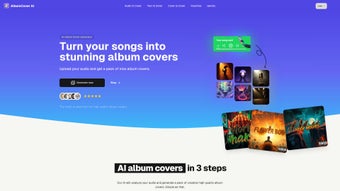

Download Album Cover AI – AI‑Generated Album Art, Free & Secure Tool
Overview
Album Cover AI is a cutting‑edge, web‑based software application that uses advanced artificial intelligence to turn any audio track into a high‑resolution, professionally designed album cover. The platform is built for musicians, producers, record labels, and anyone who needs eye‑catching visual branding without hiring a graphic designer. By simply uploading an MP3, WAV, FLAC, or any other common audio format, the AI analyses the waveform, tempo, key, and spectral features to infer the genre, mood, and emotional intensity of the music.
It then maps those musical attributes to visual concepts such as color palettes, brush strokes, composition styles, and typography, delivering a cover that feels custom‑made for each track. The generated artwork meets the exact specifications required by major streaming services, social‑media platforms, and print‑on‑demand providers, ensuring that you can publish instantly without additional resizing or editing. Album Cover AI operates entirely in the cloud, which means you can access it from any device with a modern browser—whether you’re on a Windows laptop, a macOS desktop, a Linux workstation, or a mobile device running Android or iOS.
The service prioritises security with end‑to‑end encryption, and it automatically deletes uploaded audio files within minutes after processing, guaranteeing privacy for unreleased material. With a generous free tier that allows three covers per month and affordable paid plans for unlimited use, Album Cover AI offers a fast, cost‑effective, and secure solution for creating album art in minutes, democratizing high‑quality design for creators at every level.
Key Features & Benefits
- AI‑driven visual synthesis that interprets genre, tempo, and emotional tone.
- Support for all major audio formats: MP3, WAV, FLAC, AAC, and more.
- Library of 25+ artistic styles, including minimalist, vintage, cyberpunk, and abstract.
- High‑resolution output (up to 6000 × 6000 px) suitable for digital distribution and print.
- Instant preview mode with real‑time adjustments for color palette and typography.
- One‑click export to JPG, PNG, or SVG, ready for upload to Spotify, Apple Music, Bandcamp, etc.
- Secure cloud processing with end‑to‑end encryption; no data is stored after the session.
- Free tier offering three covers per month; paid plans unlock unlimited downloads and priority rendering.
- Automatic versioning and update notifications to keep the AI model current.
- Cross‑platform accessibility – works on Windows, macOS, Linux, Android, and iOS browsers.
Pros
- Fast turnaround – most covers are generated in under 30 seconds.
- No design experience required; the AI handles composition and color theory.
- Cost‑effective compared to hiring a graphic designer.
- Secure handling of your music files; privacy‑focused architecture.
- Scalable for single tracks or full album projects.
Cons
- Creative control is limited to preset styles; custom hand‑drawn art isn’t possible.
- High‑resolution exports require a paid subscription.
- Internet connection needed; offline use is not supported.
Installation, Usage & Compatibility
Album Cover AI is a pure web application, so there is no traditional installation process. You simply download the service by navigating to the official website, creating a free account, and signing in. The platform is built on modern HTML5, CSS3, and JavaScript, ensuring seamless operation across all major browsers, including Chrome, Firefox, Safari, and Edge. Because the heavy lifting is performed on secure cloud servers, the client side consumes minimal resources, making the tool ideal for older laptops, high‑end workstations, tablets, and smartphones alike.
Step‑by‑Step Usage Guide
- Create an account: Click “Sign Up,” enter your email, and set a password. You can also use Google or Apple single sign‑on for a faster start.
- Upload your track: Drag and drop an audio file or click the upload button. The platform accepts files up to 500 MB, which covers most full‑length albums.
- Select a style: Browse the style gallery and click on the visual theme that best matches your music’s vibe.
- Adjust parameters: Use the sliders to tweak color intensity, add optional text (artist name, album title), and choose typography.
- Generate & preview: Hit “Create Cover.” Within seconds, the AI presents a high‑definition preview. You can regenerate if you’d like a different interpretation.
- Download: Choose your preferred file format (JPG for streaming platforms, PNG for transparency, SVG for vector needs) and click “Download.” The file is saved directly to your device.
Compatibility: Since Album Cover AI runs in a browser, it works on Windows 10/11, macOS Monterey and later, most Linux distributions with a modern browser, as well as Android 8.0+ and iOS 13+. No additional plugins or extensions are required, and the responsive interface automatically scales for tablets and smartphones, ensuring a consistent experience across devices.
Updates & Support
The development team pushes regular updates to improve AI accuracy, add new artistic styles, and enhance security. Users receive an in‑app notification when a new version is available, and the cloud‑based nature of the tool means you always work with the latest model without manual downloads. Support is offered via live chat, email, and a comprehensive knowledge base that includes tutorial videos, troubleshooting tips, and best‑practice guides for maximizing your cover’s impact on streaming platforms. A vibrant community forum also allows users to share their creations, request new styles, and exchange feedback directly with the product team.
Frequently Asked Questions
Is Album Cover AI really free to use?
Yes, the platform offers a free tier that lets you generate up to three album covers per month. This is ideal for testing the service or for occasional releases. For unlimited creations and higher‑resolution exports, you can upgrade to a paid plan starting at $9.99 per month.
Can I use the generated artwork for commercial releases?
Absolutely. All covers produced by Album Cover AI come with a commercial‑use license. You can upload them to Spotify, Apple Music, Bandcamp, or even press them on vinyl and merchandise without any additional royalties.
What file formats are supported for download?
The service provides JPG, PNG, and SVG downloads. JPG is recommended for most streaming services, PNG is useful when you need a transparent background, and SVG is perfect for scaling vector graphics without loss of quality.
How does the AI understand my music’s mood?
Album Cover AI analyzes the audio waveform, tempo, key, and spectral features to infer genre and emotional tone. It then maps these attributes to visual concepts like color palettes, brush strokes, and composition styles, creating a cover that feels synchronized with the sound.
Is my music file stored after the cover is generated?
No. Album Cover AI follows a strict privacy policy: audio files are encrypted during upload, processed in memory, and automatically deleted from the servers within 15 minutes of generation. This ensures your unpublished tracks remain confidential.
Can I customize the generated cover beyond the preset styles?
While the AI currently works within a set of predefined artistic styles, you can fine‑tune the result using the built‑in sliders for color intensity, typography, and text placement. For more granular control, you can export the SVG file and edit it in vector‑editing software such as Adobe Illustrator or Inkscape.
Conclusion & Call to Action
Album Cover AI bridges the gap between music creation and visual branding, offering a secure, fast, and affordable way to produce album artwork that feels handcrafted. By harnessing AI, the platform eliminates the bottleneck of traditional design cycles, allowing artists to focus on what they do best—making music. Whether you’re releasing a single on SoundCloud, a full album on Spotify, or a limited‑edition vinyl, the tool delivers high‑resolution, platform‑ready covers in minutes. The free tier provides a risk‑free entry point, while the paid plans give power users unlimited access to premium features, priority rendering, and higher‑resolution exports.
Ready to give your tracks a visual identity that matches their sound? Download Album Cover AI now, sign up for the free tier, and start generating stunning covers today. Upgrade anytime to unlock unlimited creations and priority rendering—your music deserves a cover that stands out.
Pros: Fast generation, diverse style library, high‑resolution output, secure cloud processing.
Cons: Limited to preset styles, premium needed for unlimited use, requires internet connection.



.png)



